
The 2/2 schedule is one of the most common in Russia — used in security, retail, healthcare, and manufacturing. Two days on, two days off. Sounds simple. But after a month without a clear system, it's easy to lose track: when is your shift, when is your colleague's? Do your days off align with your partner's? This article explains how the calculation works, where people most often go wrong, and how to automate it.
How the 2/2 cycle works
The 2/2 schedule is a repeating 4-day cycle: two working days, then two days off. The cycle isn't tied to the week — it runs continuously.
| Cycle day | Status |
|---|---|
| 1 | Work |
| 2 | Work |
| 3 | Day off |
| 4 | Day off |
| 5 | Work (cycle repeats) |
To find the status of any day, you need two things: an anchor date (any known working day to start counting from) and the calculation formula itself.
How to calculate
The manual calculation works like this:
- Take an anchor date — for example, January 1 you were working
- Count the number of days between the anchor date and the target day
- Divide by 4 and take the remainder: 0 or 1 — work, 2 or 3 — day off
Example: anchor date January 1 (work day). We want to check March 25. Difference — 83 days. 83 ÷ 4 = 20 remainder 3. Remainder 3 — day off. So March 25 is a day off.
For a single date — it's doable. But what if you need a quick overview of the next month? Or check when your days off align with your spouse who works a different schedule? That's where the difficulties begin.
Where people go wrong
1. Losing the starting point
The most common mistake is mixing up the anchor date. Your colleague said he works on the 1st, you used that as a reference — but he's on a different rotation at the same company. The result: your entire calculation is off by a day, and you show up on your day off.
2. Sick days and vacation break the count
This is a key misconception: sick days and vacation don't shift the cycle. The schedule continues by formula regardless of whether you were sick or on leave. Employees often think that missing a day means a shift — and start recalculating from the wrong point.
If you take 5 sick days — the cycle continues without you. When you return, the day's status is calculated from the same anchor date, as if there was no break.
3. Public holidays and swapped shifts
Your employer moves a shift due to a holiday or operational need — that's a one-off deviation that doesn't change the base formula. But if you don't record it separately, a month later you won't remember why one day didn't match the calculation.
How the app solves this
ShiftSchedule does exactly what's described above — automatically. You enter the anchor date and cycle parameters once, and the app handles all the calculations.
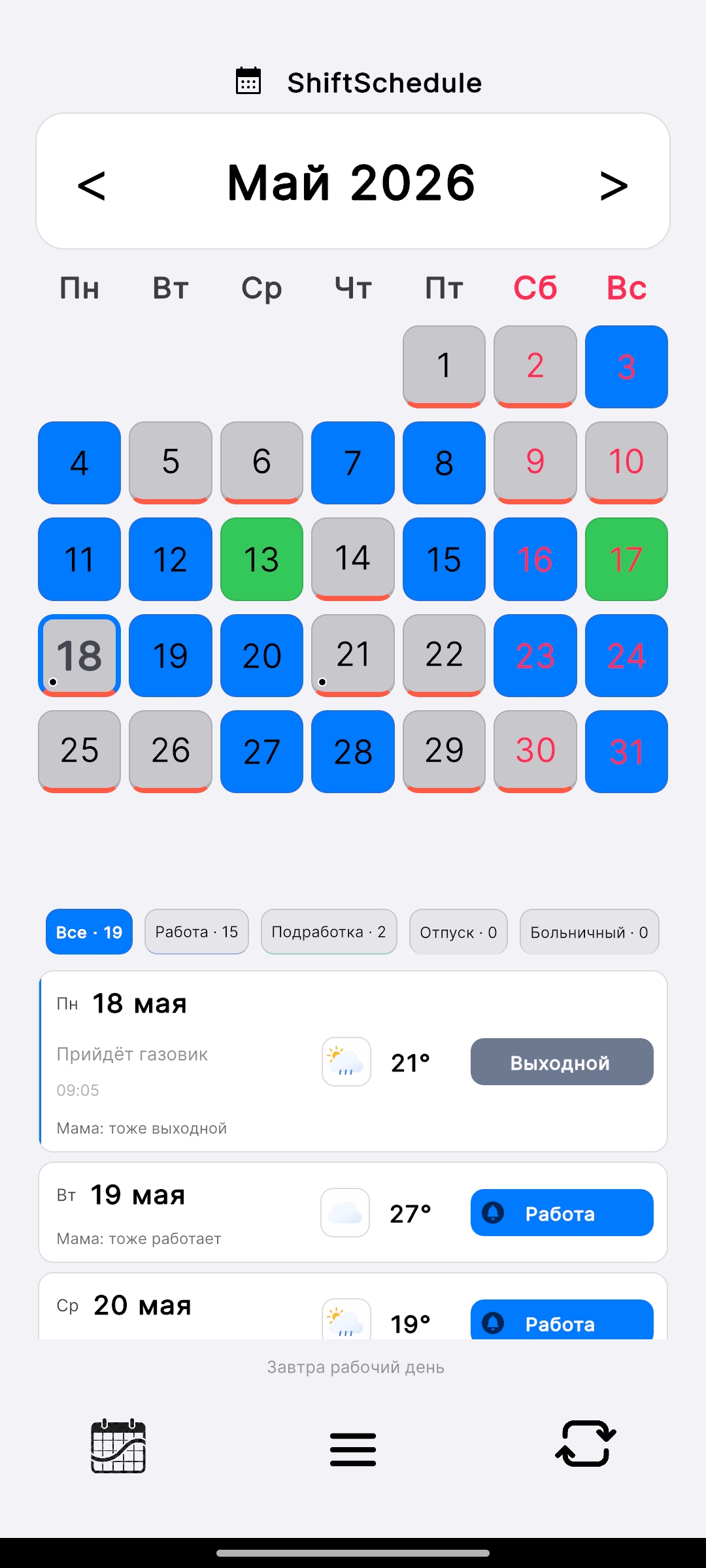
How to set up a 2/2 schedule
-
1Open the app → tap Settings → Schedule section
-
2Set work days: 2 and days off: 2
-
3Choose an anchor date — any day when you know you were working
-
4Done. The app automatically colors the entire calendar: blue cells for work days, grey for days off
Manual adjustments without losing the rhythm
If something changes on a specific day — tap the cell and set the appropriate status: sick leave, vacation, or an extra shift. This doesn't shift the cycle — it only marks the deviation for that day. The base formula continues to work correctly for all other days.
Additional features
- Partner schedule — add your spouse's or colleague's schedule and instantly see shared days off right in the calendar
- Schedule alarms — the app automatically sets an alarm before each shift with the lead time you choose
- Day notes — attach reminders to specific dates: "bring documents", "evening round"
- Alice — ask by voice: "do I work today?", "when is my next day off?"
2/2 isn't the only option. ShiftSchedule supports any cycle: 3/3, every third day (1/3), 5/2, day/night, or any other combination of work and rest days.
ShiftSchedule — free for Android
Set up any shift schedule in minutes. Partner sync, alarms, notes, voice control via Alice.
Get on RuStore Direct APK